
Hermes with Flame: Persistent Sandboxes and Parallel Code Execution
An agent’s execution requirements change during a task. Preparing a dataset and reading the resulting file requires continuity between tool calls. Evaluating independent alternatives requires concurrent work and separate results. Both patterns arise in data analysis, generated-code validation, and parameter exploration.
hermes-flamepy connects these execution patterns to Flame through two Hermes tools: sandbox and session. Hermes continues to orchestrate the task on the client, while Flame schedules code execution on Linux workers. The integration uses flamepy.agent and Flame’s built-in flmbox application, backed by the gVisor runsc runtime.
This article demonstrates a stateful analysis followed by independent scenario calculations. The examples were validated from a Mac against a running Flame cluster using the registered plugin handlers, with proxy environment variables removed. They are live tool-handler results, rather than an end-to-end model-generated Hermes chat transcript. The tested versions were hermes-flamepy 0.2.0 and flamepy 0.7.0.
Execution architecture
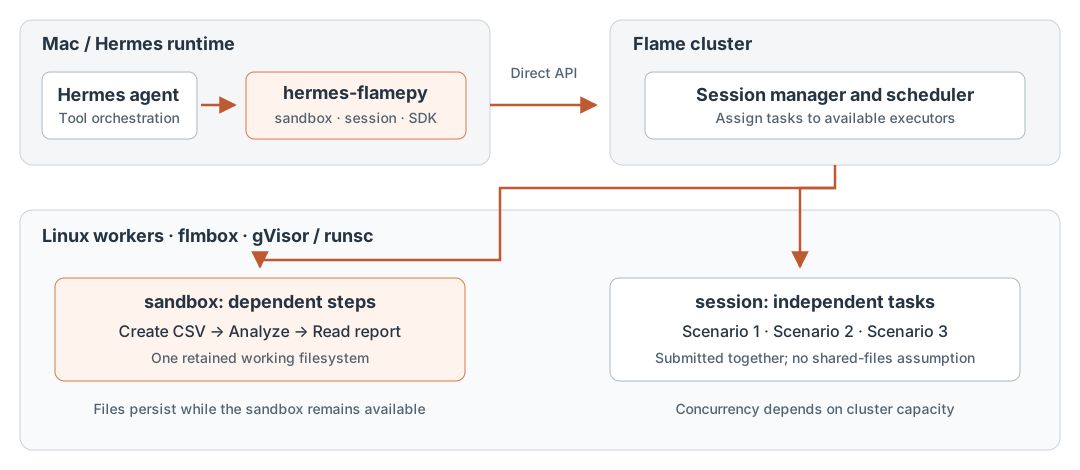
Figure 1. The plugin connects Hermes tool calls to Flame execution. The model provider remains separate from the code-execution cluster.
| Tool | Input | Execution pattern | Result |
|---|---|---|---|
sandbox |
One code string |
Sequential calls in a persistent sandbox; files under /tmp remain available while that sandbox exists |
Stdout on success; a tool error including exit code, stderr, and available stdout on failure |
session |
A codes list of 1–64 strings |
Submit independent snippets together through one reusable Flame session | A JSON-encoded array of per-snippet exit codes, stdout, and stderr, in input order |
Both tools accept language, either python or shell, and an optional per-snippet timeout. Python is the plugin default. Parallel execution depends on available executors and cluster policies; the 64-snippet input limit does not guarantee 64 simultaneous executions.
The distinction is a dependency rule. Use sandbox when a later step needs an earlier step’s files. Use session when each snippet can run from its own inputs. Session snippets may execute on different workers and must not depend on a shared /tmp directory or a particular worker assignment.
Demo 1: retain analysis files across tool calls
A useful Hermes request is:
Use the flamepy sandbox tool to create a small sales CSV, calculate its
total revenue and profit in a separate Python call, and read back the saved
report in a third call. Keep all files in a dedicated directory under /tmp.
The following blocks are the source passed in each tool call’s code field. The validation run used a unique directory; the examples normalize its path to /tmp/hermes-flamepy-demo for readability. Use a dedicated directory for your own run.
Create the input
Tool: sandbox; language: shell; timeout: 30.
mkdir /tmp/hermes-flamepy-demo
cat > /tmp/hermes-flamepy-demo/sales.csv <<'CSV'
region,revenue,cost
east,120,75
west,80,55
east,150,90
west,100,70
CSV
printf 'sales.csv created\n'
Observed stdout:
sales.csv created
Compute and save the report
Tool: sandbox; language: python; timeout: 30.
import csv
import json
import platform
from pathlib import Path

work = Path("/tmp/hermes-flamepy-demo")
rows = list(csv.DictReader((work / "sales.csv").open()))
revenue = sum(int(row["revenue"]) for row in rows)
profit = revenue - sum(int(row["cost"]) for row in rows)
summary = {"rows": len(rows), "revenue": revenue, "profit": profit}

(work / "summary.json").write_text(json.dumps(summary))
print(json.dumps(summary))
print(platform.system())
Observed stdout:
{"rows": 4, "revenue": 450, "profit": 160}
Linux
The client runs on macOS; the code executes in the remote Linux environment. The second call reads the CSV created by the first call rather than transferring it back through the model’s context.
Read the artifact in another call
Tool: sandbox; language: shell; timeout: 30.
cat /tmp/hermes-flamepy-demo/summary.json
Observed stdout:
{"rows": 4, "revenue": 450, "profit": 160}
This verifies filesystem continuity across three tool calls. Each call starts a command or interpreter process, so Python variables and shell settings do not automatically persist. Files provide the working state between calls. In the validation run, the two demo files and their dedicated directory were removed afterwards without closing the existing sandbox.
Demo 2: submit independent scenarios together
Suppose the agent must compare three discount policies and validate an invalid input. These calculations are independent and can be submitted in one session tool call:
Use the flamepy session tool to evaluate discounts of 0%, 10%, 20%, and
120%. Submit all four snippets together. Each snippet must include its own
input data and reject a discount outside [0, 1]. Return every outcome,
including the expected failure for 120%; do not retry that invalid input.
Each element of codes contains a complete Python program based on this template, with discount set to 0.0, 0.1, 0.2, or 1.2. The call uses language: python and timeout: 30 for every snippet.
import json

revenues = [120, 80, 150, 100]
costs = [75, 55, 90, 70]
discount = 0.1

if not 0 <= discount <= 1:
    raise ValueError("discount must be between 0 and 1")

revenue = round(sum(revenues) * (1 - discount), 2)
profit = round(revenue - sum(costs), 2)
print(json.dumps({
    "discount": discount,
    "revenue": revenue,
    "profit": profit,
}))
The observed results, in the order of the submitted snippets, were:
| Discount | Exit code | Revenue | Profit | Outcome |
|---|---|---|---|---|
| 0% | 0 | 450.0 | 160.0 | Success |
| 10% | 0 | 405.0 | 115.0 | Success |
| 20% | 0 | 360.0 | 70.0 | Success |
| 120% | 1 | — | — | ValueError: discount must be between 0 and 1 |
For example, the tool’s first result object is:
{
  "exit_code": 0,
  "stdout": "{\"discount\": 0.0, \"revenue\": 450.0, \"profit\": 160.0}\n",
  "stderr": ""
}
The fourth snippet’s nonzero exit does not discard the successful results. If a submitted future fails because of an infrastructure or SDK error, its result is represented by exit_code: -1 with the error in stderr. An error while opening the session or submitting the batch can instead fail the tool call. For a stale session, the plugin retries submission once; if submission had already partially succeeded, earlier snippets may be submitted again. Applications with side effects should account for that possibility.
The plugin submits all snippets before collecting their futures. Ordered results preserve the correspondence between each candidate and its output, even when completion order differs. The demo validates submission and result semantics; it is not a concurrency benchmark or evidence of a particular speedup.
Download the validated tool arguments and outputs. The JSON includes all four programs, the complete result array, version information, and the validation scope. Temporary paths are normalized, and private session identifiers are omitted.
Performance measured inside Kubernetes
We measured agent.Sandbox and agent.Session directly from a client pod in the Flame cluster. The experiment used flamepy 0.7.0, Python 3.12, and gVisor-backed Linux execution. The client reached the manager and object cache through internal Kubernetes Services with proxy variables removed. Timers include in-cluster RPC, scheduling, execution, result retrieval, and minimal result validation. Mac-to-cluster latency, Hermes orchestration, and model inference are outside the measured path.
Each execution worker requested one CPU and 512 MiB of memory; no GPUs were requested. The client requested one CPU and 1 GiB, with limits of two CPUs and 2 GiB. Exact image digests, package versions, per-round measurements, and validation provenance are included in the linked data files.
The allocation experiment used the worker image at revision 6dc0ed2eb66f82c4e4cc2b9c34192017ae361196, which includes PR #663, and pinned python:3.12-slim to its multi-architecture index digest. Before measurement, the index-to-platform cache alias was prewarmed and verified on all 11 workers. The separate warm-call experiment used worker revision 905a36049650af25cd86f07475bcdae091c3c98f and the Linux amd64 platform-manifest digest; its performance data records that configuration. Both are explicit SDK benchmark settings; the plugin’s functional demos use its default image reference.
Fresh allocation and first execution
We measured Sandbox allocation from the creation API call until the first Python command completes, with the SDK connection established beforehand. In each of 12 pairs, the first allocation used a new executor and service; the second created a new logical sandbox on the same retained executor. Executor IDs confirmed reuse.
| Sandbox allocation | Median → first result | Observed range |
|---|---|---|
| New executor and service | 191 ms | 168–207 ms |
| Retained executor and service | 82 ms | 70–92 ms |
The first-use median is below the 200 ms target; the observed maximum shows that the sample does not establish a 200 ms tail-latency guarantee. Image aliases were prewarmed on every worker; all 12 traced first-use samples separately confirmed an existing alias. Initial SDK connection setup is excluded. The test used temporary applications with a three-second executor release delay and enabled client timing hooks; the control samples did not use a worker tracing wrapper. These numbers measure Sandbox, not Session startup. A worker pod replacement can require the alias to be warmed again. See the first-use measurements.
The measurement does not isolate scheduler/binding, service readiness, image lookup, runtime initialization, and command execution. The total should therefore not be attributed to gVisor or RPC alone.
Calls on a retained worker
After five excluded warmup calls per API and language, each round measured 50 calls to print('agent-perf-ok') or its shell equivalent. All returned outputs were checked, producing 1,200 measured warm calls across six rounds.
| API | Language | Median latency | Typical round p95 |
|---|---|---|---|
| Sandbox | Python | 25.16 ms | 29.15 ms |
| Sandbox | shell | 8.60 ms | 10.10 ms |
| Session, one worker | Python | 23.64 ms | 26.54 ms |
| Session, one worker | shell | 8.67 ms | 9.74 ms |
The median column is the median of the six within-round medians. The p95 column is the median of six within-round p95 estimates, each based on 50 observations. It describes these rounds; it is not a pooled tail estimate or a production latency guarantee. A retained worker still starts a new snippet process, so these values are not isolated scheduler overhead.
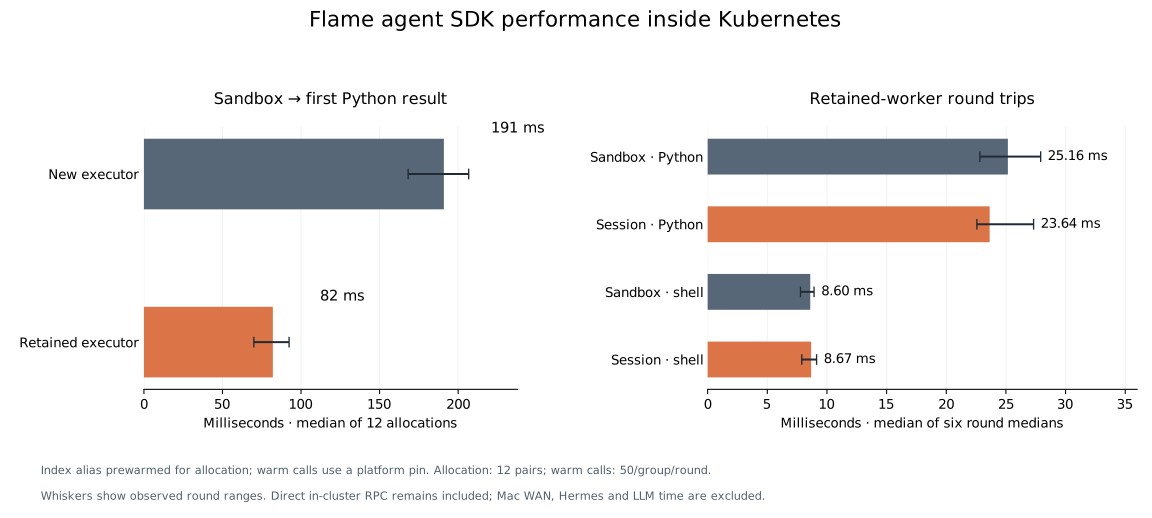
The allocation experiment checked all 12 pairs, independently reproduced its summary, and cleaned up its temporary sessions, executors, and client namespace. The separate warm-call experiment checked 1,200 calls, and its summary was independently reproduced after collection.
Parallel throughput is outside this report’s validated scope. A separate eight-worker Session pool allocation timed out; its partial results are excluded. These measurements also do not establish whole-agent response time, maximum cluster throughput, or DAS affinity benefits.
Advantages provided by Flame
Remote execution from a lightweight client
Hermes can run on a Mac while generated code executes on Linux workers. The Mac does not need to host the Linux sandbox runtime or run the analysis inside its own workspace. The same plugin interface can use a multi-worker Flame deployment without the agent selecting node addresses for individual snippets.
This moves the code-execution workload to the cluster. It does not move the Hermes model provider or make inference part of the plugin.
Continuity for dependent work
A persistent sandbox supports an analysis workflow that spans several reasoning and tool-use steps: prepare inputs, generate a program, inspect its output, and revise the program. Files can remain with the worker between these steps. The CSV demo verifies this behavior directly.
The plugin also directs pip installations to /tmp/site-packages and adds that directory to PYTHONPATH. Dependencies installed in an active sandbox can therefore be imported in later calls. The examples here use only the standard library; package downloads were not part of validation. Session snippets should install any required packages within the snippet that uses them, since a subsequent snippet may run on another executor.
Cluster scheduling for independent work
The session tool exposes Flame’s task-submission model to the agent. Independent generated tests, scenario calculations, or data partitions can be submitted together, while Flame schedules them onto available executors. This avoids implementing a separate worker-address map and task-dispatch loop in every agent integration.
The current tool schema does not expose per-call image selection, CPU/GPU requirements, or custom affinity hints. Resource allocation follows the configured Flame application and session policies. In particular, these demos do not exercise DAS or KV-cache-aware inference routing.
Reusable execution resources
Flame separates a session’s logical lifetime from individual task calls. The plugin reuses its machine-level Sandbox and Session handles rather than creating a new logical environment for every request. flmbox also caches unpacked, digest-verified image root filesystems on workers, allowing subsequent sandboxes to reuse an available image.
Image reuse does not preserve a previous sandbox’s working data. With the index alias prewarmed, first-use Sandbox allocation had a 191 ms median, while allocation on a retained executor had an 82 ms median. In the separate warm-call test, subsequent Python snippets completed in about 24–25 ms for the trivial command above. Session submission semantics are demonstrated by the scenario example; parallel throughput remains outside the validated performance results.
Session scope and lifecycle
In plugin version 0.2.0, the tools do not accept a sandbox or session ID. They derive stable identifiers from the Mac’s first physical network interface, using names of the form hermes-sandbox-<mac> and hermes-session-<mac>. Virtual interfaces are skipped. A host without a physical-interface MAC cannot derive these identifiers.
Different Hermes conversations on the same machine share these Flame resources. They are not separate per-chat workspaces or a multi-tenant isolation boundary. A changed physical-interface selection can select different resources. Use unique working directories for independent projects.
A restarted Hermes process can reconnect to an existing open sandbox. If the sandbox has been suspended, the plugin resumes it into a fresh environment; its old working files are not restored. A closed resource keeps its identifier on the cluster, so the plugin tries a suffixed generation such as -1 when creating a replacement.
The plugin does not automatically close its machine-level sessions. Sandbox state survives only while its environment remains available, and idle executor retention follows the cluster and session policies. Operators can inspect and release resources explicitly:
flmctl list -s
flmctl close -s <session-id>
flmctl delete -s <session-id>
Export required artifacts before closing or suspending a sandbox. The validation run used pre-existing machine sessions and left both open; only its own temporary files were deleted.
Setup and execution boundary
For an existing Hermes installation, the plugin’s documented setup is:
hermes plugins install xflops/hermes-flamepy
hermes plugins enable hermes-flamepy
hermes tools enable flamepy
If the plugin is already installed and enabled, these steps need not be repeated. The Hermes runtime needs flamepy 0.7.0 or later and a client configuration that reaches the Flame cluster. Linux workers need runsc and the registered flmbox application. The plugin currently selects python:3.12-slim; the image does not include uv, so PEP 723 dependency metadata is not supported by these tools.
For direct connections, remove proxy settings from the process that actually executes the SDK calls. If Hermes uses a persistent gateway, changing the environment of a CLI client does not change the environment already inherited by that gateway. The demos in this article ran in a separate direct-only handler process without restarting or changing the shared gateway.
The runtime provides gVisor-backed execution with a read-only root filesystem and writable /tmp. Network access is a separate operator-controlled property. The current built-in flmbox application starts with --network=host, so sandbox code can reach destinations available to the worker process, including internal services. It should not be described as a network-isolated environment. See the upstream flmbox network configuration for the distinction between the built-in application and the runtime’s default none mode.
Validation scope
The functional checks invoked the installed plugin’s registered handlers from macOS, using an existing Flame cluster and direct SDK connections. They verified cross-call file access, remote Linux execution, ordered Session results, three successful calculations, one expected command failure, and scoped file cleanup. Existing machine-level sessions were preserved, and those functional checks created no new session IDs.
The separate in-cluster SDK experiment measured fresh-allocation startup and warm calls using its own temporary sessions. It did not validate parallel throughput or measure model quality, full Hermes conversations, uncached image downloads, network-egress restrictions, or tenant isolation.
The integration’s practical contribution is a single cluster execution path for two common agent patterns: stateful work in a retained sandbox and independent tasks in a reusable session. Hermes selects and interprets tool calls; Flame supplies scheduling, worker execution, and session lifecycle.