
Customized Session of OpenAI Agent SDK with Flame
As more and more agents are being adopted in enterprises, it becomes increasingly important to deploy and manage them using distributed systems such as Kubernetes, Flame, or other cloud solutions. However, running agents remotely in the cloud introduces unique challenges for some fundamental features:
- Running AI agents in the cloud incurs extra costs when they are idle, and conversation history—that is, the agent’s memory—can be lost if the agent shuts down.
- HITL (Human-in-the-Loop) describes an approach where human operators can intervene or collaborate with AI agents during decision-making. In a cloud environment, it’s important for the agent to not only remain available, but also to persist the conversation history between the human and the agent.
Recently, Flame introduced a new feature called CommonData, designed to manage shared data and context across tasks of session. By letting Flame handle this common data, agents can persist the conversation history between humans and agent, ensuring continuity even if the agent is restarted or distributed across nodes. Additionally, CommonData lays the foundation for future agent optimizations, such as enhanced memory and context-aware processing.
In this blog post, we explore how Flame’s CommonData feature works, and demonstrate its integration with the OpenAI Agent SDK’s Session to enable persistent and seamless agent conversations in distributed environments.
Common Data
Flame’s CommonData feature enables sharing data and context across different tasks within a session. In its initial release, CommonData was introduced as a read-only construct. Even with read-only access, it serves several practical scenarios, such as providing the agent’s system prompt or facilitating matrix data sharing during multiplication tasks.
However, certain scenarios demand that CommonData be writable. Examples include maintaining an agent’s memory across turns, executing Python objects remotely, or enabling reinforcement learning workflows where state must evolve over time.
It’s important to note that CommonData can be large in size. To address this, Flame employs a caching strategy to hold actual data locally, while tasks are scheduled and dispatched using expressions that describe the data (like endpoint references or versioning), rather than transferring large blobs of data directly. The following diagram illustrates how Flame’s CommonData architecture works.
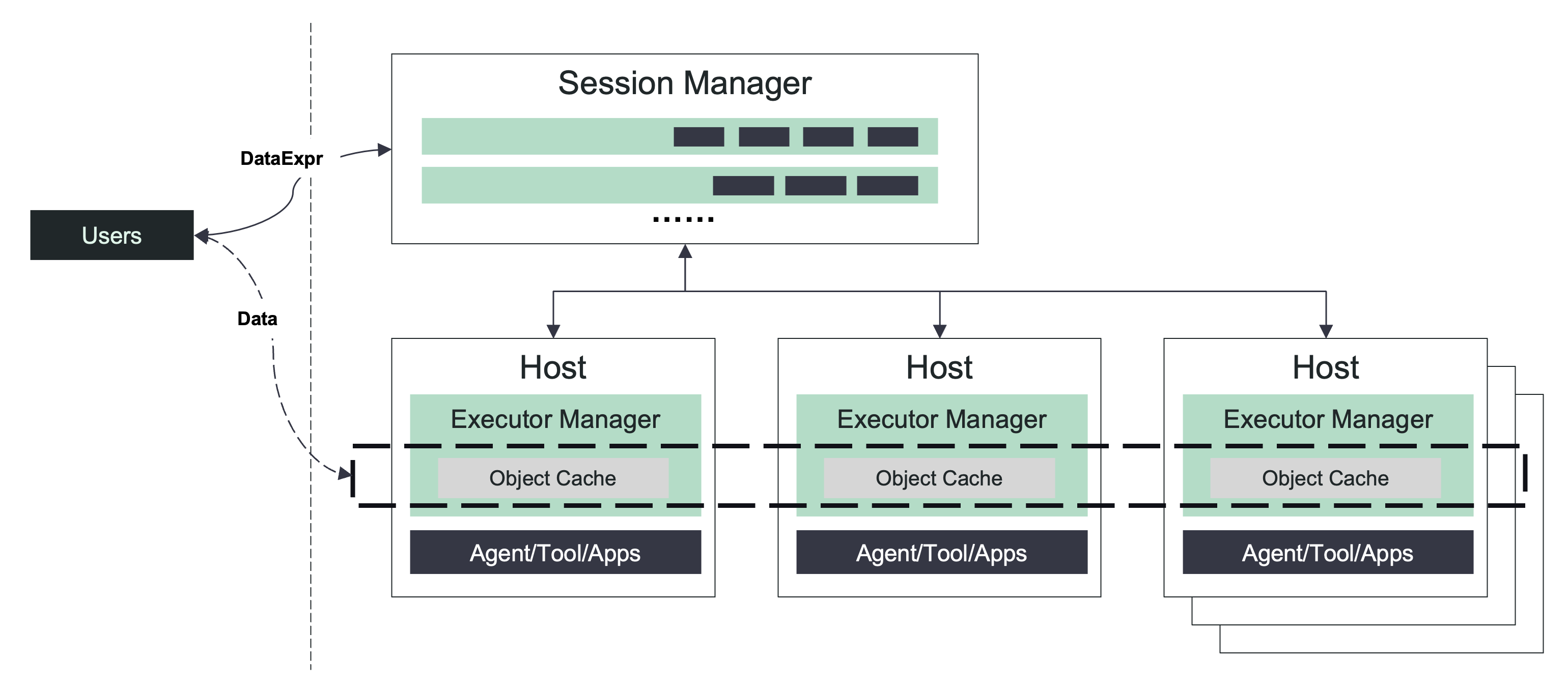
The Flame executor manager not only execute the instance but also is a cache node in cluster. Each instance can access the cache for shared context and conversation history, which persists across instance restarts and is distributed transparently by the Flame cluster.
Session of OpenAI Agent SDK
The OpenAI Agent SDK’s Session abstraction provides a standardized interface for managing persistent conversational context — or “memory” — across agent interactions. At its core, a Session acts as a protocol defining operations like retrieving, appending, or clearing conversation history and state. Out of the box, the SDK includes basic in-memory sessions (which do not persist if the agent restarts), but crucially, it enables developers to customize session backends to persist state using databases, cloud storage, or any distributed system. This extensibility is key for production and distributed deployments where durability, consistency, and cross-process visibility are needed.
The ability to implement a custom Session allows developers to handle advanced memory management needs, fine-tune performance, and integrate features like Human-in-the-Loop (HITL) workflows, auditing, or multi-agent collaboration.
By connecting the Session abstraction with Flame’s CommonData, you enable your agent to seamlessly persist and retrieve memory (conversation history, state, context) in a distributed environment. This not only allows continuity of experience across agent restarts and across cluster nodes, but also provides a natural foundation for implementing strong HITL workflows: both human and agent can share and mutate context safely and efficiently.
The next section demonstrates a straightforward example of how to integrate a custom Session backed by Flame’s CommonData, enabling robust memory management and persistent HITL support.
Example Agent
Agent Data Struct
To streamline context management in this sample agent, a MyContext class is introduced. The prompt attribute stores the agent’s system prompt, while messages maintains the conversation history, enabling the agent to keep track of all exchanges seamlessly.
@dataclass
class MyContext:
    prompt: str
    messages: List[str] = None
To take advantage of Flame’s CommonData for managing agent context, we introduce a custom session implementation. This session adheres to the OpenAI Agent SDK interface and utilizes the MyContext class to persist the agent’s conversation history efficiently. In addition to the session interface, it also provides the history() function to retrieve the conversation history.
from agents.memory.session import SessionABC

class MyCustomSession(SessionABC):
    """Custom session implementation following the Session protocol."""

    def __init__(self, ctx: MyContext):
        self._messages: List[TResponseInputItem] = []
        if ctx.messages is not None:
            for message in ctx.messages:
                self._messages.append(json.loads(message))

    async def get_items(self, limit: int | None = None) -> List[TResponseInputItem]:
        """Retrieve conversation history for this session."""
        return self._messages[:limit] if limit is not None else self._messages

    async def add_items(self, items: List[TResponseInputItem]) -> None:
        """Store new items for this session."""
        self._messages.extend(items)

    async def pop_item(self) -> TResponseInputItem | None:
        """Remove and return the most recent item from this session."""
        return self._messages.pop()

    async def clear_session(self) -> None:
        """Clear all items for this session."""
        self._messages.clear()

    def history(self) -> List[str]:
        """Get the history of this session."""
        return [json.dumps(item) for item in self._messages]
Agent Client
In the agent client, a new session is created with the system prompt in MyContext if no session ID is provided; otherwise, an existing session is opened. After sending a question to the agent and receiving an answer, the code retrieves the common data (i.e., MyContext) using the session.common_data() API. Finally, it prints out the session’s conversation history for review.
    if ssn_id:
        session = await flamepy.open_session(ssn_id)
    else:
        session = await flamepy.create_session(
            OPENAI_APP_NAME, MyContext(prompt="You are a weather forecaster."))

    output = await session.invoke(Question(question=message))

    print(output.answer)

    cxt = session.common_data()
    print(f"{'=' * 30}")
    print(f"Session History")
    print(f"{'=' * 30}")
    if cxt is not None and isinstance(cxt, MyContext) and cxt.messages is not None:
        for msg in cxt.messages:
            print(f"{msg}")
    else:
        print("No history!")
Agent service
As with most Flame-powered agents, we initialize our agent service using flamepy.FlameInstance(), which handles the entrypoint registration. Within the agent’s function, we obtain the current session context by calling ins.context(), which retrieves any existing common data (cached by Flame). We then initialize a MyCustomSession using this MyContext, allowing us to keep track of conversation history and agent instructions. After running the agent logic, we update the context with any new messages or state by calling ins.update_context(), ensuring session continuity across future interactions.
...

ins = flamepy.FlameInstance()

...

@ins.entrypoint
async def my_agent(q: Question) -> Answer:
    global agent

    ctx = ins.context()

    logger.info(f"ctx: {ctx}, question: {q}")

    if ctx is not None and isinstance(ctx, MyContext):
        session = MyCustomSession(ctx)
        agent.instructions = ctx.prompt

        result = await Runner.run(agent, q.question, session=session)

        ctx.messages = session.history()

        logger.info(f"Update context: {ctx}")
        ins.update_context(ctx)
        logger.info(f"Update context done")
    else:
        logger.info(f"Run agent without session")
        result = await Runner.run(agent, q.question)

    return Answer(answer=result.final_output)
Output of Agent
- Start Flame cluster
[flm-dev]$ docker compose up -d
[+] up 4/4
 ✔ Network flame_default                    Created                                                                     0.0s
 ✔ Container flame-flame-executor-manager-1 Created                                                                     0.0s
 ✔ Container flame-flame-console-1          Created                                                                     0.0s
 ✔ Container flame-flame-session-manager-1  Created                                                                     0.0s
[flm-dev]$ docker compose exec -it flame-console /bin/bash
root@4d73c0737bf2:/# cd /opt/examples/agents/openai/
root@4d73c0737bf2:/opt/examples/agents/openai# ls
README.md  __pycache__  agent.py  apis.py  client.py  openai-agent.yaml  pyproject.toml  uv.lock
- Register the
openai-agentwith your Flame cluster.
Note: Remember to update the
DEEPSEEK_API_KEYin the configuration file before proceeding.
root@4d73c0737bf2:/opt/examples/agents/openai# flmctl register -f openai-agent.yaml
- Talk with agent by a new session
root@4d73c0737bf2:/opt/examples/agents/openai# uv run -- client.py -m "who are you?"
I am an AI assistant created by DeepSeek, designed to help answer questions, provide information, and assist with various tasks. If you have any questions or need assistance, feel free to ask! 😊
==============================
Session History
==============================
{"content": "who are you?", "role": "user"}
{"id": "__fake_id__", "content": [{"annotations": [], "text": "I am an AI assistant created by DeepSeek, designed to help answer questions, provide information, and assist with various tasks. If you have any questions or need assistance, feel free to ask! \ud83d\ude0a", "type": "output_text", "logprobs": []}], "role": "assistant", "status": "completed", "type": "message"}
- Get the session id by
flmctl
root@4d73c0737bf2:/opt/examples/agents/openai# flmctl list -s
 ID                   State  App           Slots  Pending  Running  Succeed  Failed  Created
 openai-agent-J1E9PE  Open   openai-agent  1      0        0        1        0       08:05:43
- Talk with agent in existing session
root@4d73c0737bf2:/opt/examples/agents/openai# uv run -- client.py -m "How about the weather of Beijing?" -s "openai-agent-J1E9PE"
Uninstalled 1 package in 23ms
warning: Failed to hardlink files; falling back to full copy. This may lead to degraded performance.
         If the cache and target directories are on different filesystems, hardlinking may not be supported.
         If this is intentional, set `export UV_LINK_MODE=copy` or use `--link-mode=copy` to suppress this warning.
Installed 1 package in 62ms
As an AI, I don't have real-time data access, but I can give you general information about Beijing's weather patterns:

**Typical Climate:**
- **Spring (Mar–May):** Mild, windy, occasional sandstorms.
- **Summer (Jun–Aug):** Hot, humid, rainy (especially July–August).
- **Autumn (Sep–Nov):** Cool, dry, generally pleasant.
- **Winter (Dec–Feb):** Cold, dry, occasional snow, often below freezing.

**Right Now (General Expectation):**
Since you're asking without a specific date, if it's currently **late autumn/early winter** (November–December), expect chilly, dry days with temperatures around **0–10°C (32–50°F)**. Mornings and evenings can be cold, and air quality can vary.

**For accurate real-time weather:**
I recommend checking:
- **Weather apps** (like AccuWeather, The Weather Channel)
- **Websites** (China Meteorological Administration, timeanddate.com)
- **Search online** for "Beijing weather today"

Would you like tips on what to wear or activities based on the season?
==============================
Session History
==============================
{"content": "who are you?", "role": "user"}
{"id": "__fake_id__", "content": [{"annotations": [], "text": "I am an AI assistant created by DeepSeek, designed to help answer questions, provide information, and assist with various tasks. If you have any questions or need assistance, feel free to ask! \ud83d\ude0a", "type": "output_text", "logprobs": []}], "role": "assistant", "status": "completed", "type": "message"}
{"content": "How about the weather of Beijing?", "role": "user"}
{"id": "__fake_id__", "content": [{"annotations": [], "text": "As an AI, I don't have real-time data access, but I can give you general information about Beijing's weather patterns:\n\n**Typical Climate:**\n- **Spring (Mar–May):** Mild, windy, occasional sandstorms.\n- **Summer (Jun–Aug):** Hot, humid, rainy (especially July–August).\n- **Autumn (Sep–Nov):** Cool, dry, generally pleasant.\n- **Winter (Dec–Feb):** Cold, dry, occasional snow, often below freezing.\n\n**Right Now (General Expectation):**\nSince you're asking without a specific date, if it's currently **late autumn/early winter** (November–December), expect chilly, dry days with temperatures around **0–10°C (32–50°F)**. Mornings and evenings can be cold, and air quality can vary.\n\n**For accurate real-time weather:**\nI recommend checking:\n- **Weather apps** (like AccuWeather, The Weather Channel)\n- **Websites** (China Meteorological Administration, timeanddate.com)\n- **Search online** for \"Beijing weather today\"\n\nWould you like tips on what to wear or activities based on the season?", "type": "output_text", "logprobs": []}], "role": "assistant", "status": "completed", "type": "message"}
Roadmap
- #273: Patch Objects to improve performances
- #274: Persist common data for closed session
- #275: Data Aware Scheduling and Routing
References
- Flame: http://github.com/xflops/flame
- OpenAI Agents SDK: https://openai.github.io/openai-agents-python/
- OpenAI Agents Session: https://openai.github.io/openai-agents-python/sessions/
- HITL: https://docs.langchain.com/oss/python/langchain/human-in-the-loop